Raumnetz (Room Network Graph)
Purpose
The Raumnetz is an element-level graph over a building: rooms (IfcSpace)
connected to the walls (IfcWall) and slabs (IfcSlab) that bound them. Two
rooms sharing a wall or slab are topologically adjacent, which gives us
room-to-room connectivity as a natural by-product of the bipartite graph —
the basis for later room-to-room pathfinding (evacuation routes, comfort-zone
analysis, installation flow).
It sits one abstraction level above connection_graph (which is
point-level, 8 bbox corners per element stitched by 5 cm proximity). Use
connection_graph for low-level topology; use room_network to answer
"which rooms share which bounding elements?"
Files
| File | Role |
|---|---|
tools/_room_network.py |
Builder + on-disk cache (schema_version = 1) |
tools/room_network.py |
/analyze tool wrapper (summary counts) |
app.py::/room_network/<filename> |
GET endpoint (cache-or-enqueue, job op room_network) |
templates/viewer.html (#roomgraph view) |
3d-force-graph-powered 3D view + 3D-viewer overlay |
tests/test_room_network_{unit,e2e,ui}.py |
Unit, Flask-client e2e, Playwright browser |
External dependency
The #roomgraph view loads 3d-force-graph@1.77.0
from the unpkg CDN:
<script src="https://unpkg.com/3d-force-graph@1.77.0/dist/3d-force-graph.min.js"></script>
The library is self-contained — it ships its own Three.js bundle, d3-force-3d simulator, and orbit controls. No NPM/build step required.
Data model
One bundle per architectural IFC, cached as <stem>.room_network.json:
{
  "schema_version": 2,
  "ifc_fingerprint": "<mtime>_<size>",
  "nodes": [
    {"id": "room:<gid>", "type": "room", "gid": "...", "name": "1", "long_name": "Raum 1",
     "storey": "EG", "volume_m3": 70.2, "centroid": [x, y, z]},
    {"id": "wall:<gid>", "type": "wall", "gid": "...", "element_id": 115,
     "storey": "EG", "length_m": 10.4, "height_m": 2.8,
     "is_external": true, "u_value": 3.49, "centroid": [...]},
    {"id": "slab:<gid>", "type": "slab", "gid": "...", "element_id": 89,
     "storey": "EG", "area_m2": 35.0, "predefined_type": "FLOOR",
     "is_external": false, "u_value": 0.35, "centroid": [...]}
  ],
  "edges": [
    {"source": "room:A", "target": "wall:W", "relation": "bounds",
     "area_m2": 8.4, "adjacency": "external", "adjacent_room_gid": null,
     "face_tag": "face_min"},
    {"source": "room:A", "target": "wall:W", "relation": "bounds",
     "area_m2": 12.3, "adjacency": "to_adjacent", "adjacent_room_gid": "gid-of-B",
     "face_tag": "face_max"},
    {"source": "room:A", "target": "slab:S", "relation": "ground",
     "area_m2": 35.0, "adjacency": "ground", "adjacent_room_gid": null}
  ],
  "stats": {"rooms": N, "walls": N, "slabs": N, "edges": N, "orphan_rooms": [...]},
  "extraction_warnings": [...]
}
Edge relation ∈ {bounds, floor, ceiling, roof, ground}. adjacency
follows the Heizlast vocabulary: external, to_adjacent, to_unheated,
to_heated, ground, roof. adjacent_room_gid is the GlobalId of the
room on the opposite face of a wall / above-or-below side of a slab — set
for any edge whose adjacency == "to_adjacent".
Extraction pipeline
build_room_network() is a thin transformation layer over existing
machinery:
- Envelope — calls
tools/_heizlast_surfaces.py::extract_heated_envelope()forsurfaces_by_room. This already does: - wall sub-range splitting (a 10 m wall fronting three rooms emits three
distinct surfaces with distinct
adjacency/adj_space_gidvalues), - slab→space XY-overlap matching + Z-alignment,
- floor / ceiling / roof / ground classification.
- Enrichment — calls
extract_all_elements()for wall lengths, heights, slab areas, and centroids. - Collapse — per surface row, emit one edge with the room as source and the wall/slab as target. One wall→room edge per sub-range is emitted, so a corridor wall fronting three rooms yields three distinct edges.
IfcWallStandardCase / IfcSlabStandardCase are captured automatically —
ifcopenshell's by_type() defaults to include_subtypes=True. All walls
are normalised to type: "IfcWall" in the node dict so downstream code is
subtype-agnostic. Regression covered by
test_ifcwallstandardcase_subtypes_are_captured (fixture: BasicHouse.ifc).
Cache invalidation
Standard mtime_size fingerprint on the source IFC, plus a
schema_version gate. Any change to either invalidates the cache — the
endpoint re-enqueues the room_network job on the next GET.
UI
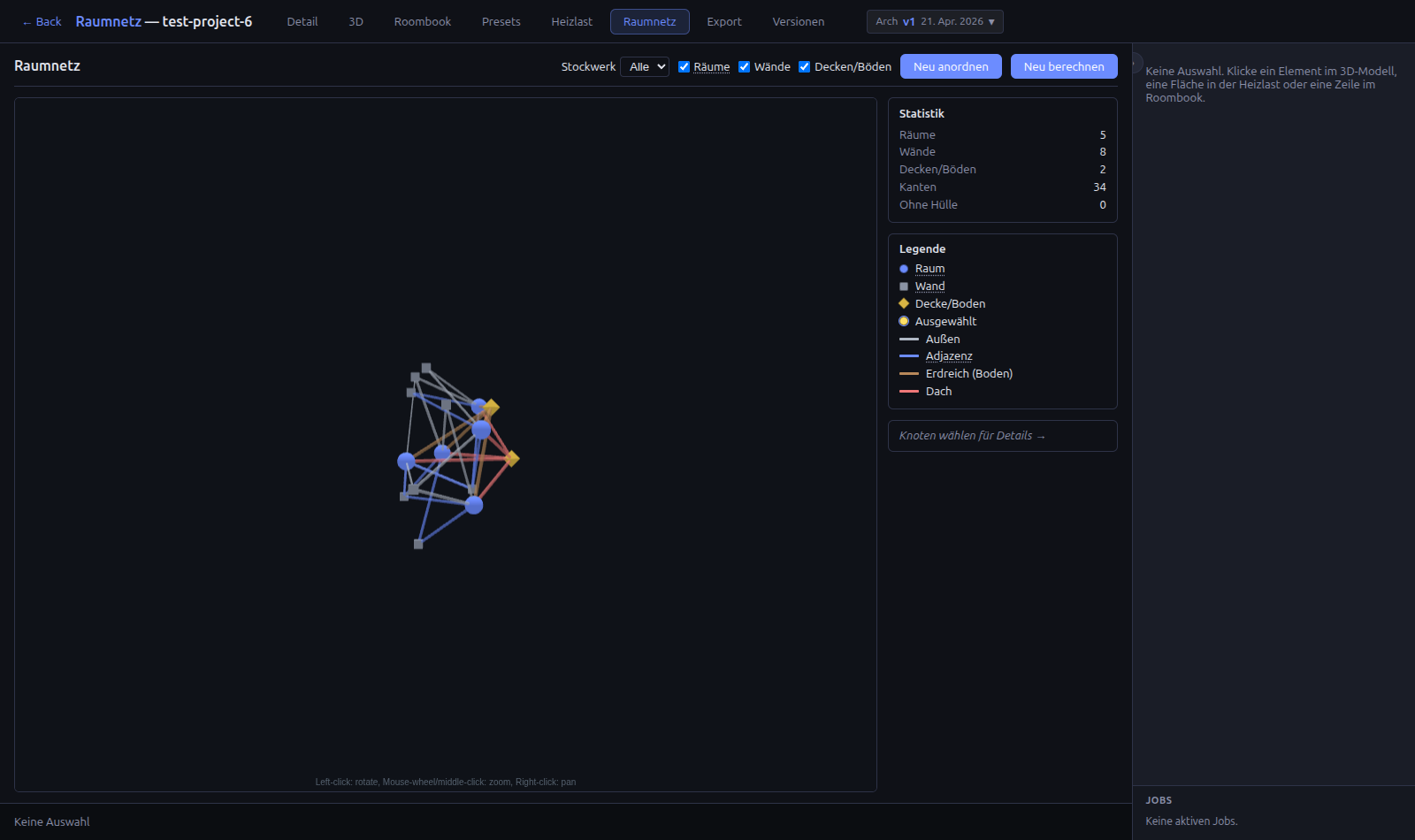
#roomgraph view (3D force-directed graph)
Rendered with 3d-force-graph
— a self-settling 3D force-directed graph built on Three.js + d3-force-3d.
Loaded from the unpkg CDN as a global; owns its own WebGL canvas inside
#rgCanvas.
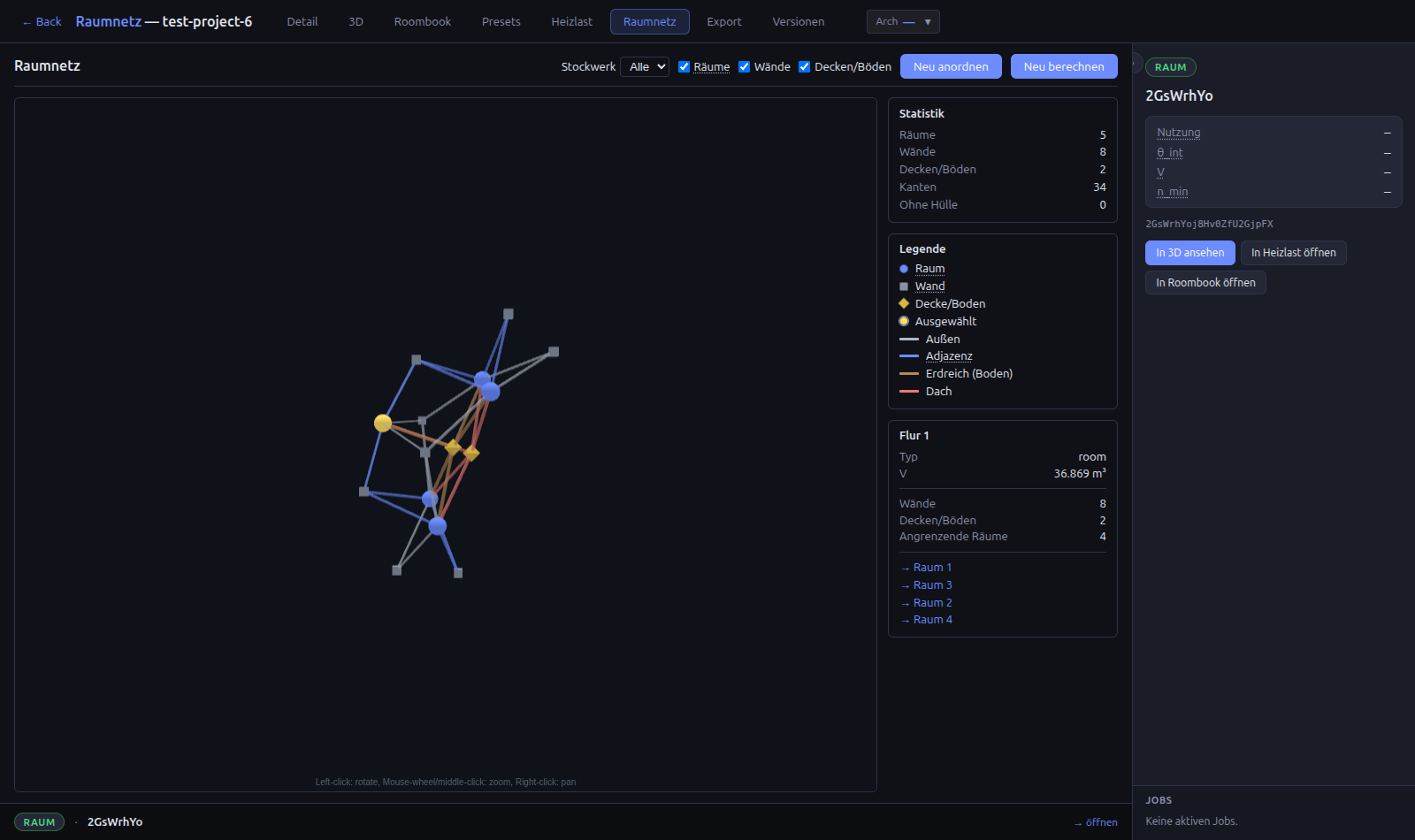
- Nodes — rooms as spheres (coloured per storey), walls as grey cubes,
slabs as yellow octahedrons. The selected node turns yellow. Size scales
with node type (
nodeVal). - Force simulation — library-managed velocity-Verlet with
d3AlphaDecay = 0.025+d3VelocityDecay = 0.45. Custom charge: rooms-120, walls/slabs-50. Link target distance 35. The simulation self-halts once alpha decays below the library's threshold — no more drifting, no more wasted CPU. - Interaction (orbit controls from Three.js, hint shown at the bottom of the canvas):
- Left-click drag — rotate the camera
- Mouse wheel / middle-click drag — zoom
- Right-click drag — pan
- Click a node — selection dispatched into
selectionStore→ Inspector + context ribbon + 3D viewer highlight all update; the camera also flies to centre on the clicked node. - Click the empty background — clears the selection.
- Toolbar — storey filter, type toggles (hide rooms/walls/slabs),
"Neu anordnen" (calls
d3ReheatSimulation()), "Neu berechnen" (forces a backend re-extract via?force=1). - Side rail — statistics, data-driven legend (see below), and a
selection panel with the clicked node's metadata plus, for rooms, a
click-through list of adjacent rooms (via
adjacent_room_gid). - Data-driven legend — every colour you see on screen is represented in the legend. The legend is built from the actual data on every render:
- One room-colour row per storey present in the model (e.g. a building
with
EG / 1.OG / Treppenhausgets three sub-rows). - One edge-colour row per edge relation/adjacency present (external, Adjazenz, Erdreich, Dach, …). Edges that don't exist in the loaded graph do not appear in the legend.
- Always-present rows: Wand, Decke/Boden, Ausgewählt.
3D overlay
The existing Graph panel (top-left of the #3d view) has a new
Raumnetz checkbox alongside Connection Graph. It renders the
element-level graph as small depth-test-bypassed markers at each element's
centroid — rooms as spheres, walls as cubes, slabs as octahedrons — with
blue lines for room↔room adjacencies and orange dashed lines for slab
edges.
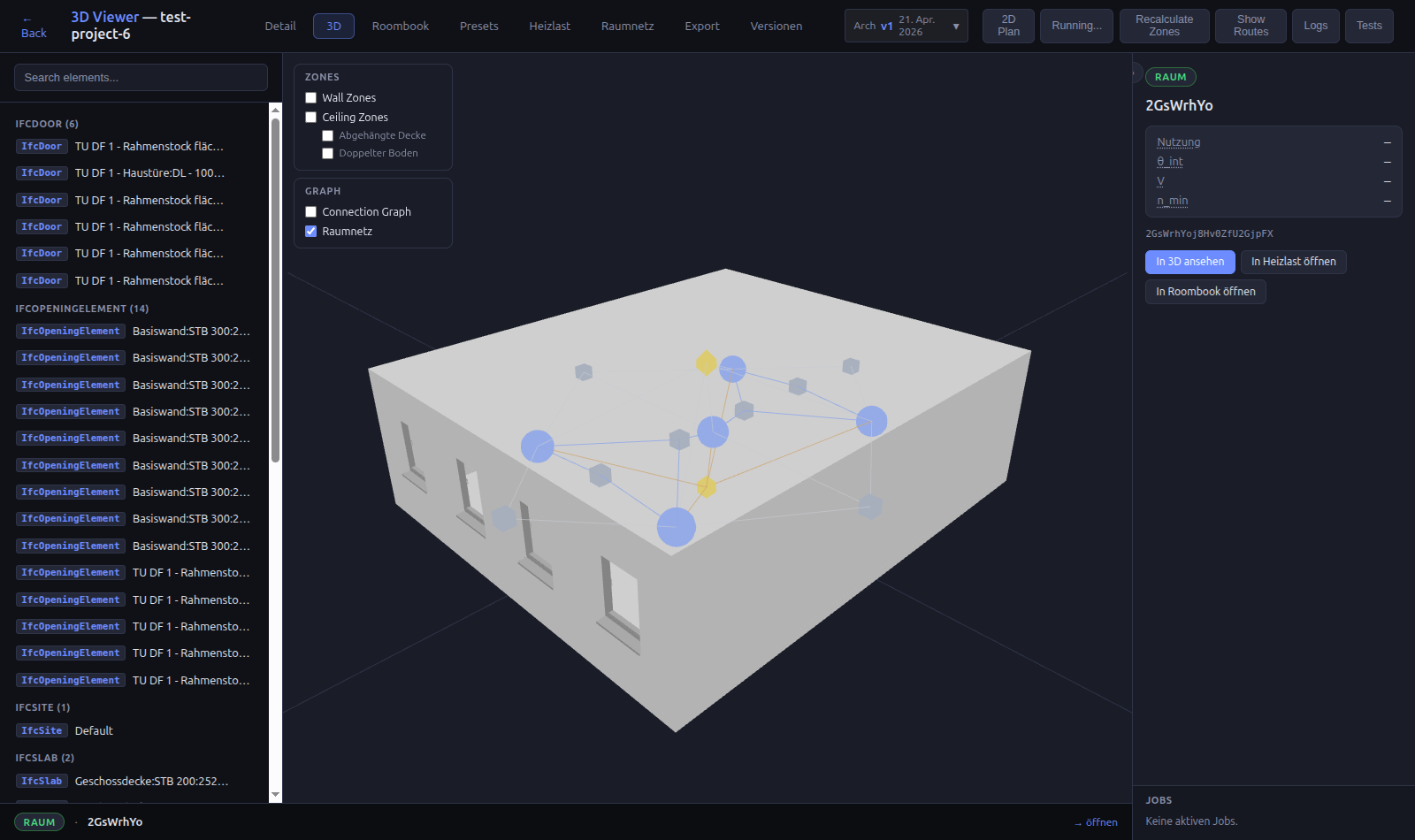
Because depthTest: false is set on both the mesh and line materials, the
markers stay visible even when they're geometrically inside a solid wall —
you can see the graph structure without needing section cuts or
transparency toggles.
Selection flow
All three graph surfaces — 2D SVG, 3D overlay, any other view — share the
global selectionStore:
- Clicking an SVG node dispatches
{type, gid, compositeID?, element_id?}→ Inspector renders the matching room/wall/slab card, context ribbon updates, and any other subscribed view highlights the selection. - Clicking a wall in the sidebar or the 3D canvas also dispatches; the
room-graph's subscription finds the matching node by GlobalId (for rooms)
or
element_id(for walls/slabs), applies the.selectedclass, and auto-pans so the node is centred in the SVG viewport.
Future work
- Doors as traversable edges — add
IfcDooras a third node type, or (simpler) annotate wall→room edges withpassable: boolwhen the wall has a door crossing the sub-range. Enables proper room-to-room pathfinding (the currentadjacent_room_gidcovers topological adjacency, not passability). - Pathfinding — A* or BFS over the room node graph, using
adjacent_room_gidas edges (or the door-annotated version). Surface as a second/room_network/<f>/path?from=&to=endpoint. - Abstract vs. geometric layout toggle — today the 2D view is
force-directed (abstract). A top-down geometric projection per storey
(using room centroids from
centroid) would complement it.
Verification
# Unit + e2e (no browser, ~80 s)
uv run pytest tests/test_room_network_unit.py tests/test_room_network_e2e.py -v

# Playwright UI (needs `uv run python app.py` in another terminal)
uv run pytest tests/test_room_network_ui.py -v